Dashboard & Menu Bar Tray
Real-time hardware gauges (APFS storage, CPU, RAM, network traffic), instant cleaning triggers, and Keep Awake toggle right from your menu bar.
Clean & Fast is a full-featured application for macOS and Windows that safely cleans unneeded caches, detects safe hidden system files (language compilers, unused device emulators), finds forgotten space hogs, and optimizes boot performance - all locally and with traffic optimization.
Free core tools · macOS 13+ & Windows 10/11 · Traffic optimization
Features
Five specialized native modules: Dashboard & Menu Bar Tray, Process & Network Monitor, Pro Developer Cleanup (SDKs & Emulators), Spotlight & DNS Repair, and Operation History.
Real-time hardware gauges (APFS storage, CPU, RAM, network traffic), instant cleaning triggers, and Keep Awake toggle right from your menu bar.
Background application monitor: inspect memory consumption, halt runaway network traffic, and safely reset or disable heavy applications.
Built for engineers: isolate Xcode & VS Code caches, Gradle/Maven daemons, Python/Node runtimes, and reclaim 16+ GB from heavy iOS/Android emulators.
One-click system repair: rebuild broken Spotlight indexes, flush DNS cache, reset Launch Services, and purge RAM with interactive terminal console.
Comprehensive log of all maintenance sessions with precise reclaimed space metrics (GB/MB), operation categories, timestamps, and exportable reports.
Safe detection of hidden system files: unneeded language compilers, SDKs, and heavy device emulators.
Clean & Fast operates strictly in volatile memory with traffic optimization. No personal files, browsing histories, or hardware identifiers are ever collected or uploaded.
Crafted natively in Swift 5.9 for macOS and Qt for Windows. Launches in under 400ms with zero persistent background daemons.
App Interface
Calm, objective, and transparent interface designed for modern macOS and Windows. Five dedicated modules for complete storage hygiene.
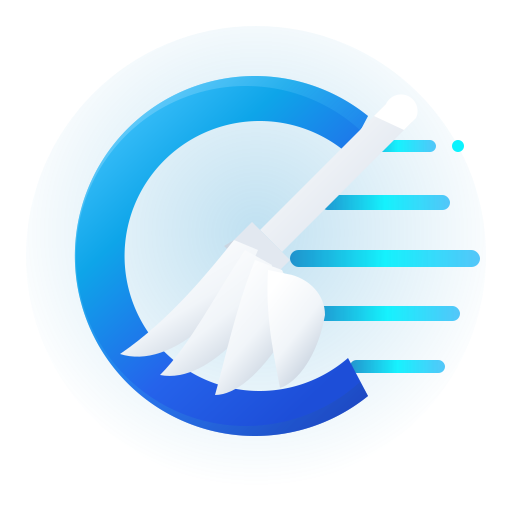 Clean & Fast — Dashboard & Tray
System Dashboard & Menu Bar Status Widget: Live system metrics at a glance: APFS disk gauge, real-time CPU and RAM pressure, and network traffic monitor (upload, download, total transfer, ecotraffic, and traffic reset). One-click quick actions ('Clean Caches', 'Quick Boost', 'Detailed Cleanup'). In the macOS menu bar, a live status widget provides instant metrics and a Keep Awake power assertion toggle.
Clean & Fast — Apps & Processes
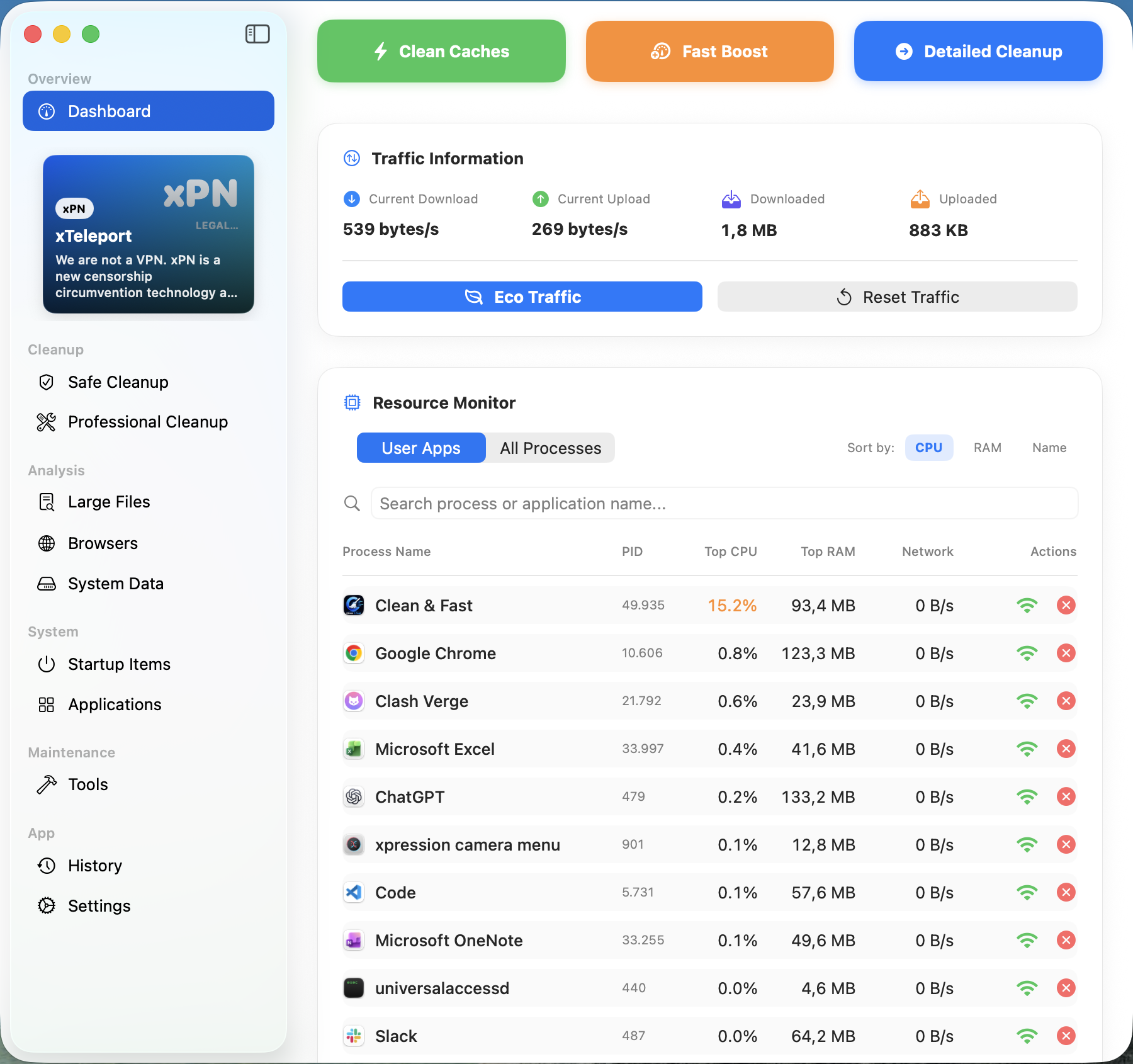
Background Applications & Process Monitor: In-depth audit of running and installed applications (Xcode, VS Code, Chrome, Slack, Office, Antigravity, etc.). Inspect exact disk footprint, memory consumption, and versions per app. Halt runaway network traffic, clear app cache, or safely quit, disable, and uninstall programs.
Clean & Fast — Pro Developer Clean
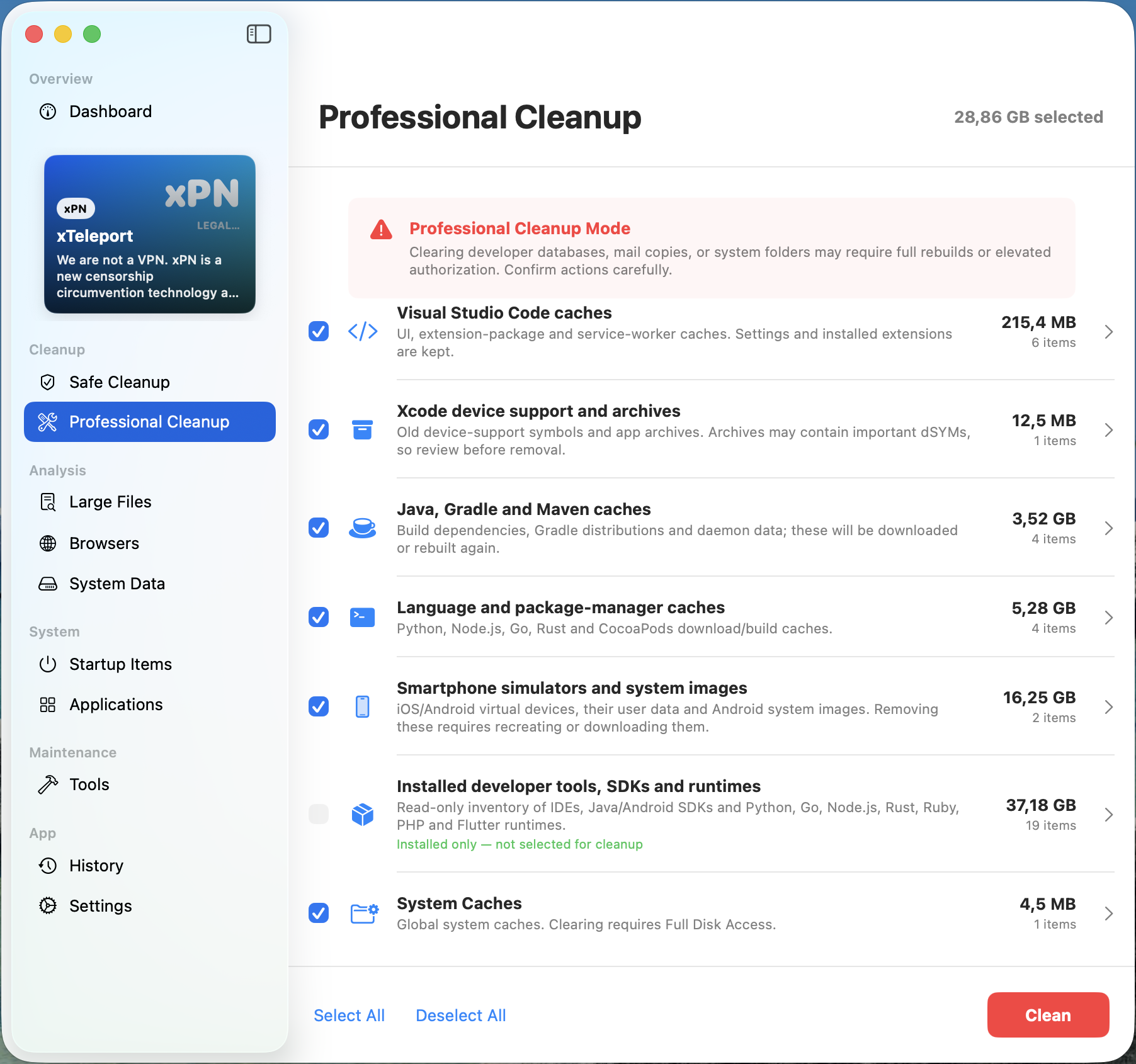
Professional Cleanup for SDKs, Runtimes & Emulators: Engineered specifically for software developers: automatically isolates build caches from Xcode (DerivedData, Swift packages), VS Code, Java/Gradle/Maven daemons, and package managers (Python, Node.js, Go, Rust, CocoaPods). Safely purge heavy mobile emulators and system images (iOS Simulators, Android Virtual Devices - 16+ GB) while maintaining a read-only inventory of installed SDKs.
Clean & Fast — Maintenance Tools
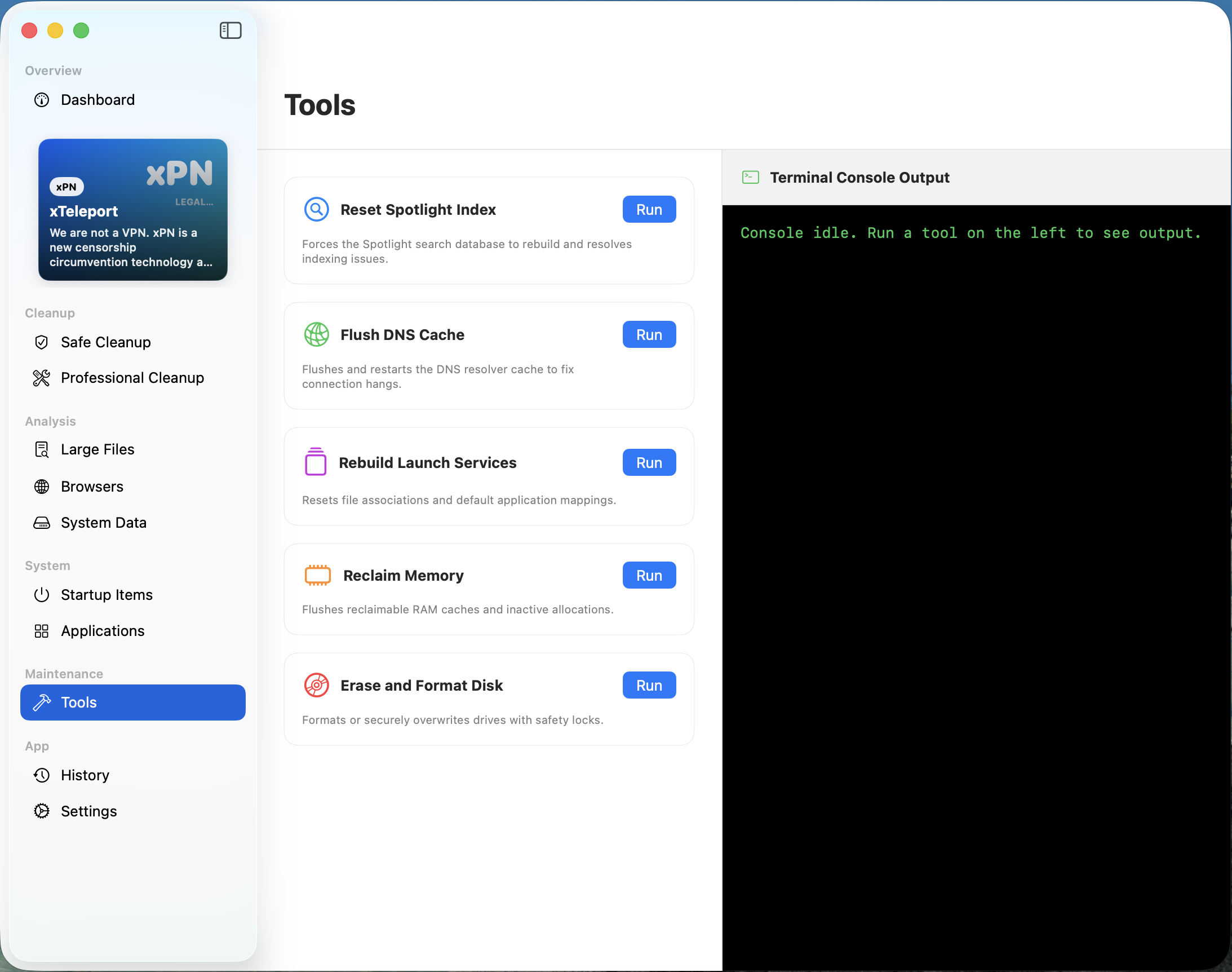
System Repair Tools: Spotlight Index & DNS Cache Flush: One-click fixes for recurring macOS hangs: force-rebuild corrupted Spotlight Search indexes, flush and restart DNS cache to cure network resolution timeouts, rebuild Launch Services file associations, purge inactive RAM, and securely format or wipe disks with real-time terminal console logging.
Clean & Fast — History & Audit
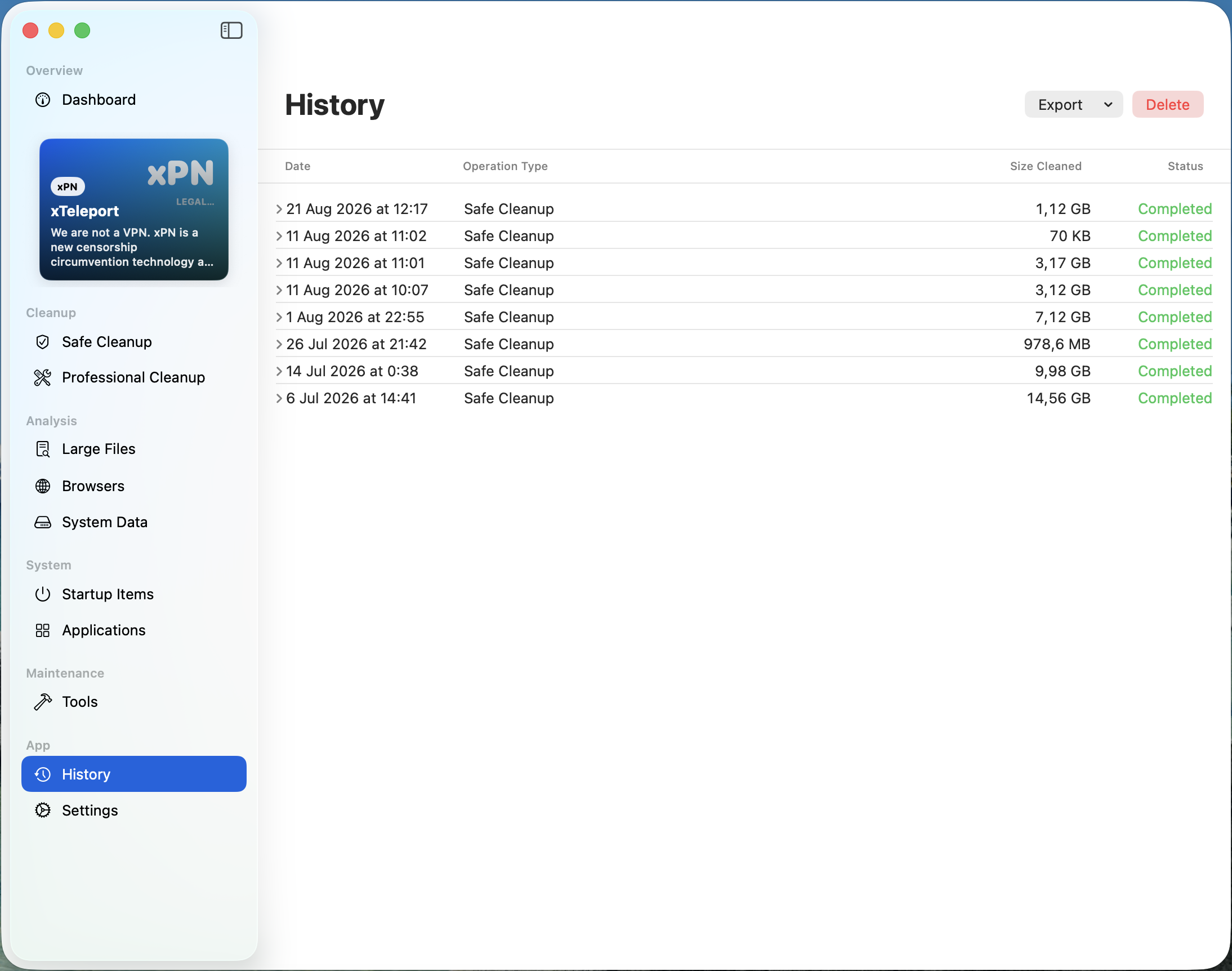
Complete Cleanup History & Space Reclaim Log: Chronological audit trail of all past maintenance passes: date, exact timestamp, operation type (Safe Clean, Pro Clean), reclaimed disk space in GB/MB, and completion status. Easily export audit reports or manage logged history.
Pure native binaries crafted for macOS and Windows with zero web wrappers.
Apple Silicon & Intel Macs
Pure Swift & SwiftUI app requiring macOS 13+ (Ventura, Sonoma, Sequoia). Zero dependencies, universal binary under 45 MB RAM.
Windows 10 & 11 (64-bit)
Full-featured desktop application with radial gauges, admin UAC escalation, and non-destructive system tray monitoring.
Mobile Storage Assistant
Lightweight companion app for photo duplicate scanning, scoped storage hygiene, and glanceable home screen widgets.
Absolute Data Privacy
All scanning and calculation executes strictly in local volatile memory. Immutable protected roots prevent OS file deletion.
Clean & Fast safely detects hidden system files: unneeded language compilers, obsolete SDKs, and heavy device emulators.
How It Works
From instant local scan to safe cleanup in four transparent steps.
Open Clean & Fast and run an instant, read-only system scan computed strictly within volatile local memory.
Inspect candidate items classified with clear Safe, Medium, or High risk badges - no alarmist scareware.
Safely remove selected junk and caches with immutable system root protection and storage optimization.
Reclaim gigabytes of space, reduce memory pressure, and keep your computer running fast and clean.
Clean & Fast runs strictly within local memory on your computer with traffic optimization, zero tracking, and zero cloud uploads.
Immutable path validators protect operating system roots and personal document folders. Critical files are never touched.
Built from the ground up under strict European privacy directives. Traffic optimization, no accounts, no telemetry SDKs, no cloud tracking.
Zero web wrappers or Electron bloat. Swift on macOS and PySide6 on Windows deliver instant launches and low resource consumption.
Free core tools forever. Upgrade to Pro for just €3.00/month or €19.00/year - a fraction of legacy tools that charge €40 to €70 a year.
Clear answers about safety, privacy, and how we protect your files.
No. Clean & Fast is engineered with hardcoded safety guardrails. System root partitions (/System, /usr, /bin, C:\Windows) and personal user folders (~/Documents, ~/Desktop, ~/Pictures) are protected by immutable path validators. The app safely identifies hidden system files, unused language compilers, and device emulators without risk to system integrity.
Incumbent applications spend millions on aggressive advertising and heavy cloud tracking infrastructure, charging €40 to €70 per year. Clean & Fast operates as a lean, local-first full-featured application with near-zero server overhead. We pass these savings directly to you, providing an honest, professional tool at just €3.00 per month or €19.00 per year.
No. Clean & Fast operates on a strict Zero-Knowledge Local Architecture. The scanning engine evaluates temporary files purely within your computer's local memory. The application contains zero analytics SDKs, transmits no machine configurations, and creates zero listening ports.
The free version provides complete, unrestricted access to all core cleaning tools (Safe Cache Cleanup, Large Files Finder, Startup Items inspection, and Health Gauges), supported by a single static sidebar ad. Upgrading to Pro (€3/mo or €19/yr) permanently removes all advertising and unlocks automated weekly background cleanups and deep tools.
Clean & Fast supports macOS 13.0 (Ventura) and newer (Universal Binary for Apple Silicon M1-M4 and Intel) and Windows 10 & 11 (64-bit).
Download Clean & Fast and reclaim gigabytes of storage safely in seconds. It's free, native, and private.
Download Cleanfast